
EOBI Registration Check by CNIC – Verify Your Status Online
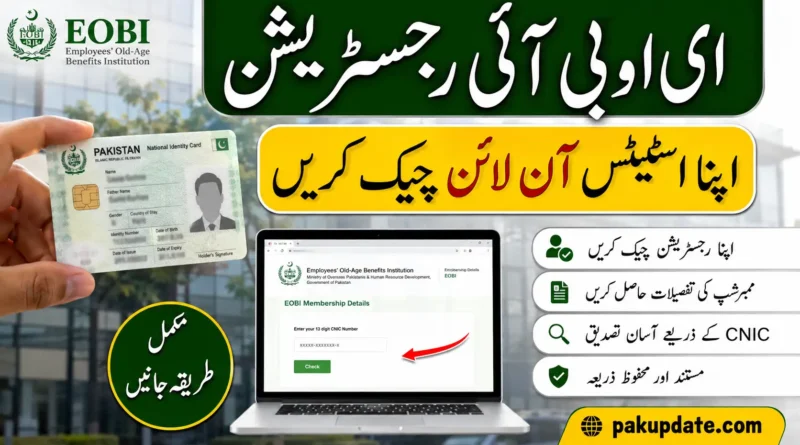
You can check your EOBI registration and available insured-person information online through the EOBI Individual Information service. Open the official EOBI website, go to Individual Information, and select Insured Person/Employee Details. Enter your CNIC as requested by the service and submit the search.
If your record is not found or some employment or contribution information appears incorrect, check your details again and contact your employer or EOBI for clarification. If you also want to explore other government support initiatives, you can read our detailed guide on Check BISP Balance Online by CNIC to learn how to check your BISP balance and payment details.
What Is EOBI and Why Check Your Registration?
EOBI stands for Employees’ Old-Age Benefits Institution. It is responsible for maintaining records and providing old-age benefits under the applicable EOBI system.
Checking your EOBI record can help you see whether your information is available in the system and whether the employment or contribution information shown for you appears correct.
A CNIC check can be useful if you:
- Want to confirm that your EOBI record exists.
- Have recently started working for an employer covered by EOBI.
- Want to review your available contribution information.
- Have worked for more than one employer.
- Notice a possible gap or error in your EOBI record.
Your registration record should not be treated as automatic confirmation that you qualify for a particular EOBI pension or other benefit. Benefit eligibility depends on the applicable rules and your individual record.
How to Check EOBI Registration by CNIC
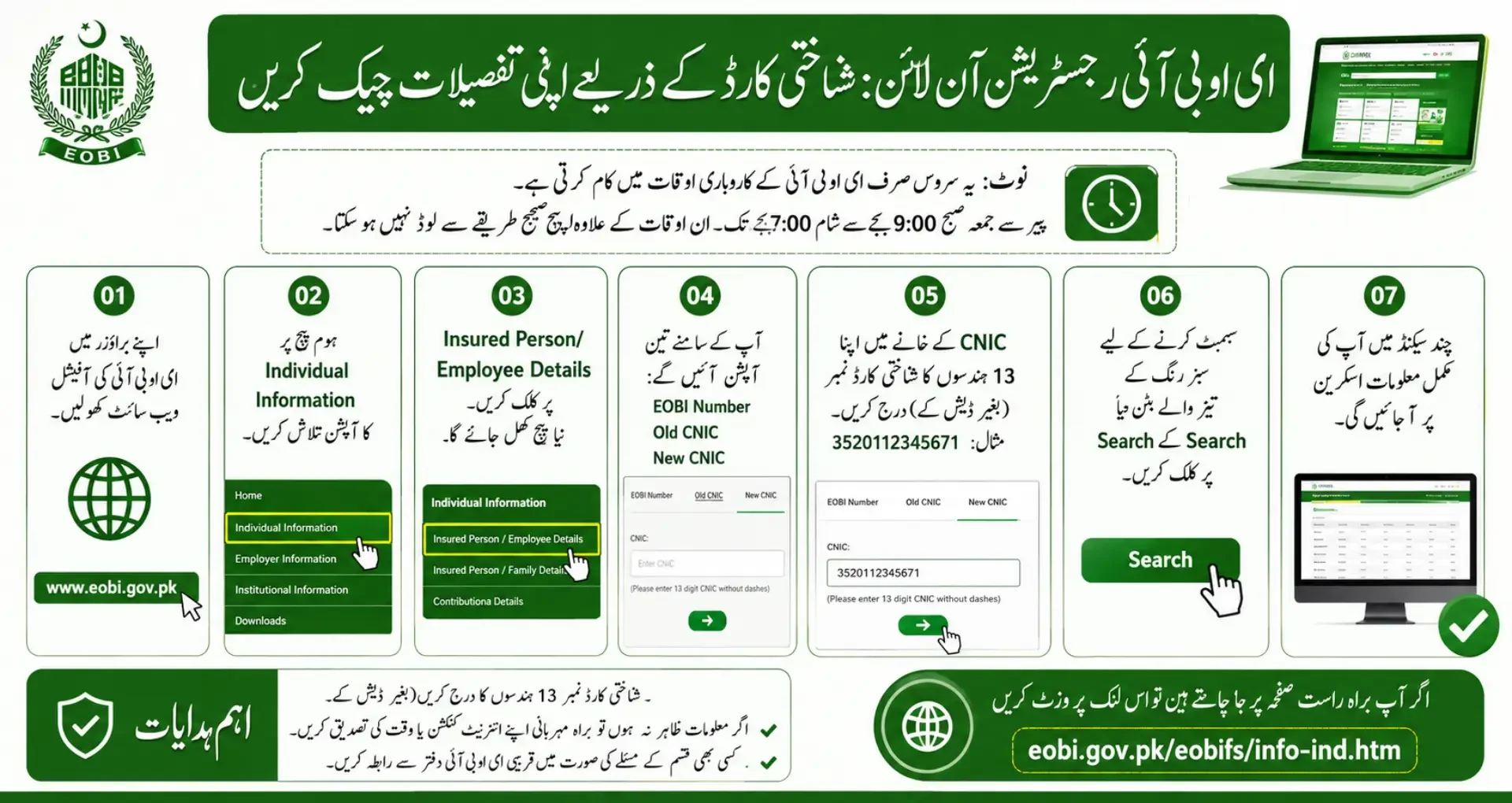
Follow these steps to check your available EOBI record online:
- Open the official EOBI website www.eobi.gov.pk.
- Go to the Individual Information section.
- Select Insured Person/Employee Details.
- Choose the applicable CNIC option shown on the EOBI page.
- Enter your CNIC as requested by the system.
- Submit the search.
- Review the information returned by EOBI.
Use the official EOBI website when entering your CNIC rather than an unofficial website that requests personal information.
If the Individual Information page does not load, try again later or use EOBI’s official contact channels for assistance.
How to Check EOBI Registration by Mobile App
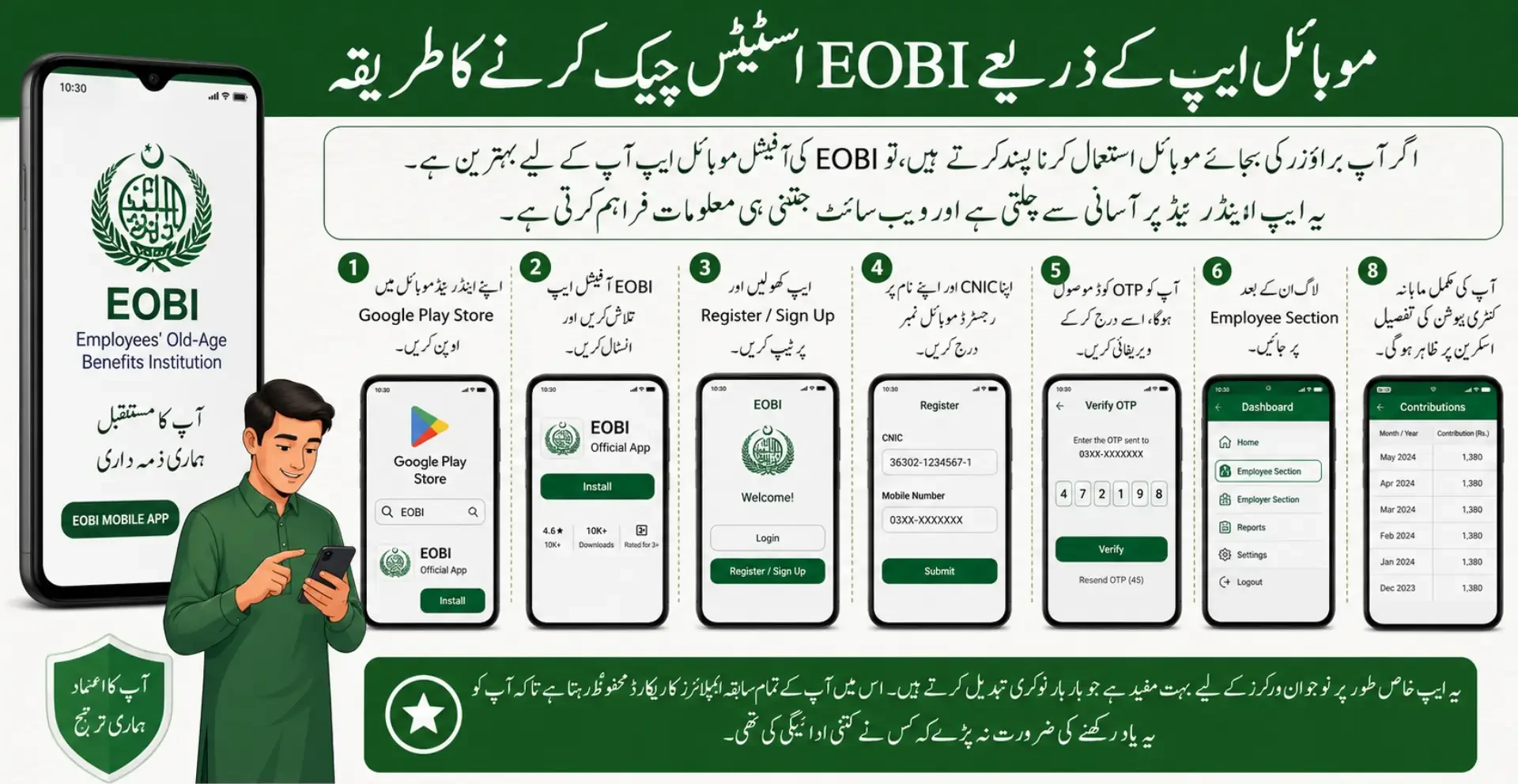
Steps:
- Open Google Play Store on your Android phone.
- Search for EOBI and install the official EOBI app.
- Open the app and tap on Register or Sign Up.
- Enter your CNIC and a mobile number registered in your name.
- You will receive an OTP code. Enter it to verify your account.
- After login, tap on Employee Section.
- Select View Employment History or View Contributions.
- Your full month wise contribution record will be displayed.
The app is especially useful for younger workers who change jobs often. It keeps all your past employer records in one place so you do not have to remember who paid what.
What Information Appears in Your EOBI Record?
The information available in your result depends on the record maintained by EOBI.
Your result may include information such as:
- Insured Person (PI) number: The identification number associated with your EOBI record.
- Name: The name recorded against your insured-person information.
- Employer information: Employment details available in your EOBI record.
- Contribution information: Available information about recorded contributions or contribution periods.
- Other record details: Additional personal or employment information may appear depending on your record.
| Field | What it Shows |
|---|---|
| PI Number | Your unique Insured Person registration number. |
| Full Name | The name registered with EOBI (should match CNIC). |
| Father / Husband Name | As recorded by your employer at the time of registration. |
| Date of Birth | Important for calculating retirement age. |
| Current Employer | The most recent organisation that contributed for you. |
| Total Months Paid | Total number of months your contributions have been recorded. |
| Contribution History | Month-wise breakdown of payments made by employers. |
Not every person’s result will necessarily contain the same fields. The information shown depends on what EOBI has recorded for that individual.
What If Your EOBI Record Is Missing or Incorrect?
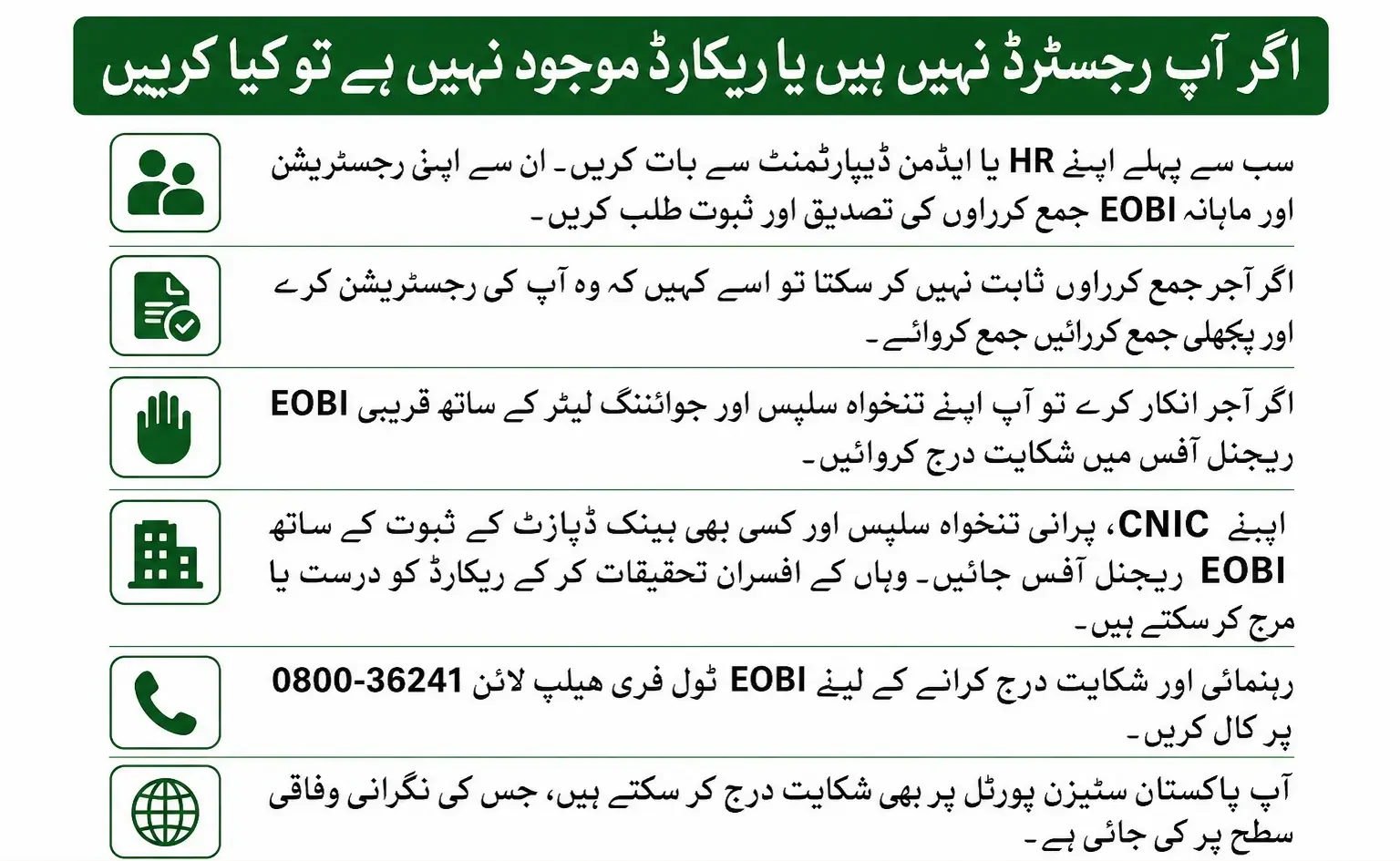
If your CNIC search does not show a record, or some information appears incomplete or incorrect, verify the details before assuming there is a problem with your registration.
1. Check Your CNIC Again
Make sure you entered the correct CNIC information and followed the format requested by the EOBI service.
2. Contact Your Employer or HR Department
If you are currently employed, ask your HR or administration department whether your EOBI registration has been submitted.
You can also ask for the relevant registration or contribution information available from your employer.
3. Keep Your Employment Records
Keep documents that can help establish your employment history, such as:
- Appointment or joining documents
- Salary slips
- Employment records
- Previous employer information
- Your CNIC
These records may be useful when discussing a missing or incorrect EOBI record.
4. Contact EOBI
If the issue cannot be resolved through your employer, contact EOBI through its official website or the relevant EOBI service channel.
Explain what appears to be missing or incorrect, such as an employer record, contribution period, or personal detail.
5. Follow EOBI’s Correction or Complaint Process
If EOBI confirms that your record needs correction, follow the instructions provided by the relevant EOBI office or official service channel.
Do not rely on claims about fixed correction times or guaranteed outcomes unless EOBI confirms them.
EOBI Registration and Pension Eligibility
An EOBI registration record can be important when reviewing your employment and contribution history. However, having a registration record does not by itself confirm that all requirements for a particular pension or other EOBI benefit have been met.
Eligibility depends on the applicable EOBI rules and the individual’s insured record.
If you are checking your EOBI information because you are preparing for a benefit claim or approaching retirement, review your actual record and confirm your eligibility with EOBI.
This guide focuses on checking your EOBI registration and record by CNIC, rather than providing unverified pension amounts or eligibility calculations.
Also Read> Sindh Laptop Scheme 2026
EOBI Contribution Rates 2026
The contribution is based on the official minimum wage set by the government. As minimum wage changes, the contribution amounts adjust accordingly.
| Paid By | Rate | Approximate Monthly Amount |
|---|---|---|
| Employer | 5% of minimum wage | Around Rs 1,600 to Rs 1,750 |
| Employee | 1% of minimum wage | Around Rs 320 to Rs 350 |
| Total Contribution | 6% of minimum wage | Around Rs 1,920 to Rs 2,100 |
These figures are based on a minimum wage of approximately Rs 32,000 to Rs 35,000. Always check the latest minimum wage notification for exact numbers, as the government revises it periodically.
EOBI Contact and Complaint Information
For questions about a missing, incorrect, or disputed EOBI record, use the official EOBI website and its current contact or service information.
| Service | Contact |
|---|---|
| EOBI Official Website | www.eobi.gov.pk |
| Individual Information Page | eobi.gov.pk/eobifs/info-ind.htm |
| EOBI Toll Free Helpline | 0800-36241 |
| Bank Alfalah EOBI Card Helpline | (021) 111-225-229 |
| Service Hours | Monday to Friday, 9 AM to 7 PM |
| ds.complaint@ophrd.gov.pk | |
| Citizen Portal | Pakistan Citizen Portal (available 24/7) |
Contact details, service arrangements, and complaint procedures can change. Check the official EOBI website for the latest information before using a phone number, email address, or other contact detail.
Frequently Asked Questions
How can I check my EOBI registration by CNIC?
Open the official EOBI website, go to Individual Information, select Insured Person/Employee Details, enter your CNIC as requested, and submit the search.
What information appears in the EOBI record?
The available record may show your insured-person information, name, employer information, and contribution-related details. The exact fields depend on the information recorded by EOBI.
What should I do if my EOBI record is not found?
First check that your CNIC was entered correctly. If the record still does not appear, ask your employer or HR department to confirm your EOBI registration. If the issue remains unresolved, contact EOBI through its official channels.
How can I correct incorrect EOBI information?
If your name, employer information, or another part of your record appears incorrect, discuss it with your employer where appropriate. Keep documents supporting your employment information and contact EOBI for instructions on correcting the record.
Can I check my EOBI contribution record online?
The EOBI Individual Information service can provide information from your available insured-person record. Contribution-related information may be shown depending on the information recorded by EOBI.
Is EOBI registration the same as pension eligibility?
No. An EOBI registration record shows that information is available in the EOBI system, but it does not by itself establish that all requirements for a particular EOBI benefit have been met.
Conclusion
The EOBI Registration Check by CNIC service can help employees review the information EOBI has recorded against their identity. The main process is to use the official EOBI Individual Information service, open Insured Person/Employee Details, enter the required CNIC information, and review the available record.
If your record is missing or contains incorrect information, first verify your details, speak with your employer where appropriate, keep relevant employment documents, and contact EOBI for further clarification.
For accurate information about your individual record or benefit eligibility, rely on the current information provided by EOBI rather than unofficial claims or outdated figures.

Pingback: Maryam Nawaz Hunarmand Naujawan Parwaaz Card 2026 | Apply Online